|
|
| (23 intermediate revisions by 2 users not shown) |
| Line 1: |
Line 1: |
| == '''Helbreath Portal launcher 17/04/2023''' == | | == '''Helbreath Portal official launcher 19/07/2025''' == |
| [https://srv53695.seohost.com.pl/Launcher/Launcher.exe '''''Download''''']
| | Extract launcher with necessary libraries to new folder and run it |
|
| |
|
| If you have problem with launch the game probably your antivirus is blocking it, add Helbreath Portal directory to exclusions
| | [[File:Download.png|frameless|link=https://srv53695.seohost.com.pl/Launcher/PortalLauncher.zip]] |
|
| |
|
| [https://support.microsoft.com/en-us/windows/add-an-exclusion-to-windows-security-811816c0-4dfd-af4a-47e4-c301afe13b26 Windows Defender]
| | == '''Helbreath Portal full game 19/07/2025''' == |
| | | Here you can download full game to extract |
| [https://support.malwarebytes.com/hc/en-us/articles/360038479234-Exclude-detections-in-Malwarebytes-for-Windows Malwerbytes]
| |
| | |
| [https://support.norton.com/sp/en/us/home/current/solutions/v3672136 Norton]
| |
| | |
| [https://support.avast.com/en-us/article/antivirus-scan-exclusions/#pc Avast]
| |
| | |
| == '''Helbreath Portal Client'''== | |
| To get actual client please use launcher if you see black screen after login its mean you have outdated client
| |
| | |
| =='''Helbreath Portal full game'''==
| |
| '''''[https://srv53695.seohost.com.pl/Game/Helbreath_Portal.exe Download]'''''
| |
|
| |
|
| == '''Visual C++ Redistributable for Visual Studio 2015''' ==
| | [[File:Download.png|frameless|link=https://srv53695.seohost.com.pl/Game/Portal_19.07.2025.zip]] |
| [[File:Msvcp140.jpg|frameless]] | |
|
| |
|
| '''''[https://www.microsoft.com/en-US/download/details.aspx?id=48145 Download]''''' | | =='''Visual C++ Runtimes All in One May 2023'''== |
| | Here u can install all visual c++ runtimes, extract it to folder and run instal_all.bat it will install one by one version of runtimes. |
|
| |
|
| =='''Additional library files'''== | | [[File:Download.png|frameless|link=https://srv53695.seohost.com.pl/Game/VisualRuntimes.zip]] |
| [https://srv53695.seohost.com.pl/Game/mrc.zip '''''Download''''']
| |
| =='''FAQ'''== | | =='''FAQ'''== |
| [[File:RtaImage.jpg|frameless|590x590px]]
| |
|
| |
|
| '''''[https://www.microsoft.com/en-US/download/details.aspx?id=48145 Download]''''' | | === '''I have black bars on the sides of my screen. How do I make it fill the entire screen?''' === |
| | '''Nvidia users:''' |
|
| |
|
| '''''I have black bars on the sides of my screen. How do I make it fill the entire screen?'''''
| |
|
| |
| =='''Nvidia users:'''==
| |
| 1. Right click desktop -> nvidia control panel -> Display -> Adjust desktop size and position | | 1. Right click desktop -> nvidia control panel -> Display -> Adjust desktop size and position |
|
| |
|
| Line 39: |
Line 24: |
| [[File:Mvidia.png]] | | [[File:Mvidia.png]] |
|
| |
|
| =='''AMD users''' ==
| | '''AMD users''' |
| | |
| 1. Right click desktop -> AMD Catalyst Control Center -> My Built-in Displays -> Properties (Built-in Display) | | 1. Right click desktop -> AMD Catalyst Control Center -> My Built-in Displays -> Properties (Built-in Display) |
|
| |
|
| Line 46: |
Line 32: |
| [[File:AMD.png]] | | [[File:AMD.png]] |
|
| |
|
| ='''0xc000007b error'''= | | === '''Antivirus warnings''' === |
| [[File:Obraz.png]]
| | Some antivirus can see our launcher or client as false positive, we reporting it to antivirus company after each client update but it take time to respond them, if your antivirus deleting it after download you need add to exceptions Helbreath Portal directory. |
|
| |
|
| =====<u>'''Fixing error 0xc000007b'''</u> <u>'''win7/8/10/11'''</u>=====
| | Here you can find how to do it on popular antivirus |
| First of all, we need to make sure that the appropriate libraries are installed on our system at all. Files from the DirectX Redistributable package or Visual C++ libraries may be missing. To do this, download and install the following packages:
| |
|
| |
|
| #<code>https://www.microsoft.com/en-US/download/details.aspx?id=35</code>
| | [https://support.microsoft.com/en-us/windows/add-an-exclusion-to-windows-security-811816c0-4dfd-af4a-47e4-c301afe13b26 Windows Defender] |
| #<code>https://www.microsoft.com/en-US/download/details.aspx?id=48145</code> '''32/64 BIT'''
| |
| | |
| Download all these items and then install them on your computer. For Visual C++ packages, download both the 32-bit and 64-bit versions. After installing the three packages above, restart your computer and verify that previously non-working programs now start correctly.
| |
| | |
| If the above method does not help, then there is another way. The problem with error 0xc000007b also occurs when the system uses invalid DLL files from Visual C++ libraries. The program requires 32-bit libraries to work, and the system forces 64-bit libraries, which results in a classic "crash" of the application.
| |
| | |
| ====='''Download MSVCR100.dll'''=====
| |
| <code>https://www.dll-files.com/msvcr100.dll.html</code>
| |
| | |
| Download the above file and extract it from the ZIP archive to any place. If the file was downloaded without the extension, right-click on it, select "Rename" and add the ".zip" extension to it. Then we will be able to open it with any extractor program. After unpacking, we will get the correct MSVCR100.dll file. Copy and paste it to the path below:
| |
| | |
| <code>C:\Windows\System32\</code>
| |
| | |
| If we have a 64-bit system, we also paste the above file into the folder:
| |
| | |
| <code>C:\Windows\SysWOW64\</code>
| |
| | |
| When the system asks us to overwrite existing files, we agree. Then we restart the computer. This time, programs displaying error 0xc000007b should work normally.
| |
| | |
| ====='''The game does not respond to "play game"'''=====
| |
| <u>'''Your antivirus is blocking the client.exe launch, you need to add the entire game folder according to the guide here'''</u>
| |
| | |
| <code>https://support.microsoft.com/en-us/windows/add-an-exclusion-to-windows-security-811816c0-4dfd-af4a-47e4-c301afe13b26</code>
| |
Helbreath Portal official launcher 19/07/2025
Extract launcher with necessary libraries to new folder and run it

Helbreath Portal full game 19/07/2025
Here you can download full game to extract
Visual C++ Runtimes All in One May 2023
Here u can install all visual c++ runtimes, extract it to folder and run instal_all.bat it will install one by one version of runtimes.
FAQ
I have black bars on the sides of my screen. How do I make it fill the entire screen?
Nvidia users:
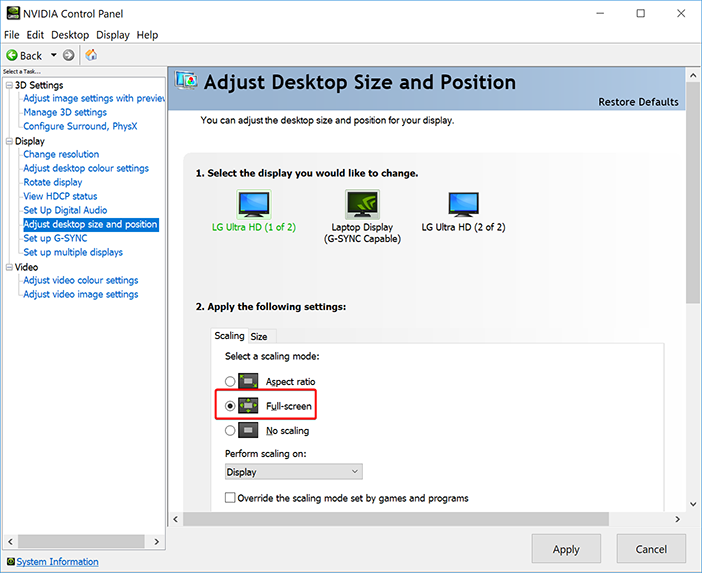
1. Right click desktop -> nvidia control panel -> Display -> Adjust desktop size and position
2. In the "Scaling" tab, you want to select full screen instead of aspect ratio.
AMD users
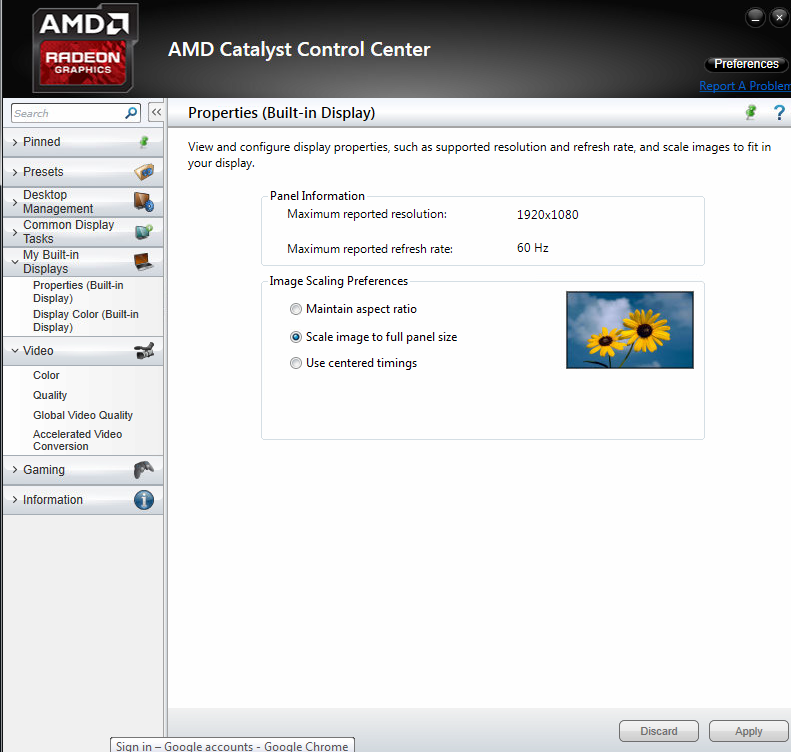
1. Right click desktop -> AMD Catalyst Control Center -> My Built-in Displays -> Properties (Built-in Display)
2. Select "Scale image to full panel size" and click apply.
Antivirus warnings
Some antivirus can see our launcher or client as false positive, we reporting it to antivirus company after each client update but it take time to respond them, if your antivirus deleting it after download you need add to exceptions Helbreath Portal directory.
Here you can find how to do it on popular antivirus
Windows Defender


